3Q0/3QD*(MFK 2.0)辅助驾驶摄像头编码
本说明仅适用于 3Q0980654 摄像头
带自适应车道居中的 Lane Assist — 自适应居中可消除在车道之间"来回弹"的现象。
这个选项非常出色,能让人在驾驶时放松下来,不必刻意去追车道中心,跑高速时简直不可或缺。
Traffic Jam Assist — 堵车行驶辅助。
这是 Lane Assist 的扩展,可在 0 km/h 起工作。在堵车时车辆会自行转向、加速和制动,无需驾驶者参与。停车超过 3 秒后,起步需要按 RES 或踩油门踏板。
Emergency Assist — 紧急停车辅助。
如果驾驶者不愿或无法参与车辆操控,车辆会先以声音唤醒他,随后以急促的制动介入,
如果驾驶者仍然不接管,车辆会自行开启双闪并停车。
Sign Assist — 交通标志识别辅助。显示摄像头读取到的标志。
辅助驾驶摄像头固件
位于此处:固件与参数数据集
驾驶辅助功能激活
IQ Light 矩阵大灯
模块 A5(辅助驾驶摄像头)→ 编码:
AFS_coding_Light_Assist: Matrixbeam
→ 应用
激活驾驶辅助调用按键(适用于 5Q0 953 502 AJ / Valeo 408 876)
模块 16 → 匹配:
转向柱电子装置
驾驶辅助系统按键
已安装
→ 应用
激活不含自适应车道居中的 Lane Assist
Warning
激活 Lane Assist 不需要为已安装的辅助驾驶摄像头更新参数数据集
开启仪表上的 Lane Assist 显示
模块 17(组合仪表/ActiveInfoDisplay)→ 编码:
字节 04 – 位 6 (Lane_assist): 激活
字节 11 – 位 1 (Lane_assist_BAP): 激活
辅助驾驶摄像头配置
可以使用现成的编码:
000307060007040100220044C150890080000E20004000
模块 A5(辅助驾驶摄像头)→ 编码:
字节 14 – 将数值改为 A0/A1
字节 16 – 位 7: 激活(或将字节数值改为 90/98)
模块 A5(辅助驾驶摄像头)→ 匹配:
Lan_assist_system_mode(车道保持辅助开启状态) - Selection_over_menu
Lane_assist_warning_intensity(车道保持辅助警告强度) - Selection_over_menu
Personalization of lane dept. warning Cl. 15 on(15 号电接通时干预时机的个性化) - Last Setting(最后设置)
→ 应用
HCA – 告知转向控制模块存在 Lane Assist
模块 44(转向助力)→ 编码:
字节 01 – 位 3 (Heading_control_assist): 激活
→ 应用
在菜单中启用新功能
模块 5F(多媒体)→ 匹配:
Car_Function_List_BAP_Gen2:
- LDW_HCA_0x19: activated
Car_Function_Adaptations_Gen2:
- menu_display_Lane_Departure_Warning: 激活
- menu_display_Lane_Departure_Warning_over_threshold_high: 激活
→ 应用
告知泊车辅助模块存在 Lane Assist(适用于配 PLA3.0 12 个传感器的车辆)
在 2020 年款 Tiguan 2G 上,PLA3.0 在系统中可能显示为 10 号模块,而不是 76
模块 76 → 编码:
车道保持辅助,与转向助力联动
字节 3 – 位 5 (HeadingControl Unterstutzung Auswahl): 激活 (Spurhalteassistent aktiviert)
→ 应用
激活完整套件:自适应 Lane Assist、Traffic Jam Assist、Sign Assist
带自适应车道居中的 Lane Assist — 可消除在车道之间"来回弹"的现象。
这个选项非常出色,能让人在驾驶时放松下来,不必刻意去追车道中心,跑高速时简直不可或缺。
Warning
要让 Traffic Jam Assist 工作,需要为已安装的辅助驾驶摄像头准备参数数据集。
位于此处:固件与参数数据集
告知空调模块(08)已安装摄像头加热装置。
模块 08 → 编码:
字节 08 – 位 0 (Camera heating): 已安装
→ 应用
模块 08 – 长编码:
摄像头加热元件: 未安装→已安装
告知 ACC 雷达已安装摄像头
模块 13(自适应巡航)→ 编码:
字节 03 – 位 6 (Front_camera): 已安装
→ 应用
模块 13 – 长编码:
Front_camera: 未安装→已安装
将远光灯辅助类型从简单型改为 MDF – 即遮蔽式或不炫目的远光。同时在菜单中添加该辅助功能
模块 09(车载电网)→ 匹配:
Aussenlicht_Blinker:
- Warnblinken_durch_Fahrerassistenz: available
Fernlicht_assistent:
- Erweiterte_Fernlichtsteuerung: AFS, FLA, Fernlicht ueber AFS → AFS, FLA, Fernlicht (GLW,MDF)
- Menuesteuerung Fernlichtassistent: available
- Fernlichtassistent Reset: 关闭
- Menuesteuerung Fernlichtassistent Werkseinstellung: available
- Assistance_lighting_sensitivity_adjustable: detected
→ 应用
开启仪表上的 Lane Assist 和交通标志显示
模块 17(组合仪表/ActiveInfoDisplay)→ 编码:
字节 04 – 位 6 (Lane_assist): 激活
字节 11 – 位 1 (Lane_assist_BAP): 激活(在仪表辅助功能菜单中添加车道辅助)
字节 05 – 位 2 (traffic_sign_display): 激活
→ 应用
模块 17 – 长编码:
车道保持辅助: 否 → 是
交通标志识别: 否 → 是
车道保持辅助,BAP,路径: 否 → 是
激活已安装的模块。需要添加 A5(驾驶辅助前部传感器)并移除模块 20(带 FLA 摄像头的后视镜)
模块 19(网关)→ 匹配:
Gateway_Component_List: Node_0x30: not_coded
Gateway_Component_List: Node_0x4F: coded
→ 应用
模块 19 → 匹配:
远光灯辅助: 未编码
驾驶辅助前部传感器: 已编码
HCA – 告知转向控制模块存在 Lane Assist
模块 44(转向助力)→ 编码:
字节 03 – 位 0 (Heading_control_assist): 激活
→ 应用
模块 44 – 长编码:
车道保持辅助: 激活
大灯模块设置
注意!
在此模块中更改编码会导致大灯基础设置被复位。如何恢复基础设置?
模块 4B(多功能模块)→ 编码:
字节 10 – 位 6 (mdf_activation): 激活
headlamp_coding_word: 1
multi_function_camera: installed
→ 应用
模块 4B → 编码:
headlamp_coding_word: 0 → 1
mdf_activation: 未解锁 → 已解锁
告知 ABS 模块可执行紧急停车
模块 03(ABS)→ 编码:
字节 29 – 位 5 (Electromechanical parking brake): 激活 (emergenay braking)
→ 应用
模块 3C(变道辅助)设置
模块 3C → 编码:
Lane_Departure_Warning_System:_with_Lane_Departure_Warning_System
Front_Sensors_Driver_Assistance_System:_with_Front_Sensors_Driver_Assistance_System
→ 应用
告知泊车辅助模块存在 Lane Assist(适用于配 PLA 12 个传感器的车辆)
有用信息
在 2020 年款 Tiguan 2G 上,PLA3.0 在系统中可能显示为 10 号模块,而不是 76
模块 76 → 编码:
车道保持辅助,与转向助力联动
字节 3 – 位 5 (HeadingControl Unterstutzung Auswahl): 激活 (Spurhalteassistent aktiviert)
→ 应用
在菜单中启用新功能
模块 5F(多媒体)→ 匹配:
Car_Function_List_BAP_Gen2:
- LDW_HCA_0x19: 激活
- traffic_sign_recognition_0x21: 激活
- traffic_sign_recognition_0x21_msg_bus: CAN_Extended(附加数据总线)
Car_Function_Adaptations_Gen2:
- menu_display_Lane_Departure_Warning: 激活
- menu_display_Lane_Departure_Warning_over_threshol d_high: 激活
- menu_display_road_sign_identification: 激活
- menu_display_road_sign_identification_over_threshold_high: 激活
→ 应用
告知投影模块(如配备)
模块 82 → 编码:
Road_sign_detection: available
Lane_departure_warning: available
→ 应用
辅助驾驶摄像头配置。
现成编码
000307060007040100222346C154890098000E20004000
为方便起见,可以使用带 A5 模块解读的位计算器。
例如,现成编码可以在位计算器中打开
模块 A5(辅助驾驶摄像头)→ 编码:
Brand: VW
Class: A
Generation: Generation_7
Bodystyle: Suv
Expansion: Not_coded
Production_region: EU
Country_variant: Europe
Chassis: Steel_springs
Steering_bar: Not_coded
Windshield: Heat_protecting_glass
Traffic_side: Right_traffic
PSD_Version: PSD_15 # (1)!
Navigation: MIB_High # (2)!
AAG: Coded # (3)!
SWA (Side assist): Coded # (4)!
ACC: Coded
Pedestrian_break: Not_coded
Blind_spot_detection: Not_coded
Rain_light_sensor: Coded
Main_unit: enabled
PLA: Coded # (5)!
ESP: Coded
Personalize_VZE:    Not_Coded
Lan_assist_system_mode: Selection_over_menu
Personalized_key: Version_1.x
Networking_variant: MQB
Radar_interface: Coded
Perso_HC: Last_setting # (6)!
Point_of_intervention: early_setting_over_menu
LaneAssist_AGW_output: disabled
Lane_assist_off_text: disabled
Emergency_Assist: EA_Variant_2
Traffic Sign Recognition (TSR/VZE): coded
HC_mob_line: Not_coded
HC: Coded
FCWP_default_on_prewarning: last_mode
FCWP_delivery_status_prewarning: off
FCWP_extended_prewarning_settings: Not_coded
FCWP_warning_indicator: Not_coded
FCWP: Not_coded
FLA_Additional_High_Beam: no_Additional_High_Beam
FLA_Headinglight_type: LED
Mains_frequency: 50_Hz
AFS_coding_Light_Assist: Dynamic_Light_Assist (or Matrixbeam for Tiguan 2021)
HC_LONGPRESS: Not_Coded (only for Audi)
→ 应用
- 路线预测数据。取决于所安装的主机(如果没有导航,则为
Not coded) - 导航类型。取决于所安装的主机
- 如果安装了拖车钩
- 如果安装了盲区监测
- 如果安装了 Park Assist
- 关闭点火开关时记忆所选模式
这些匹配数据会关闭标志失效时的警告显示
模块 A5(辅助驾驶摄像头)→ 匹配:
Road_sign_recognition_fusion_mode(交通标志识别: Fusion 模式): Road_Sign_Fusion
Lane_assist_warning_intensity(车道保持辅助警告强度): Selection_over_menu
Personalisation_point_of_intervention(干预时机个性化): Last Setting(最后设置)
Adaptation_tsr:
- Par_relevance_mode: enabled
- Par_country_mode: manuel
- Par_country_code_RSR: 205 # (1)!
- Par_country_code_VZF: 205
→ 应用
- 独联体国家可以使用波兰的数值。可选值列表:
57 — 捷克
68 — 爱沙尼亚 (50/90/90)
73 — 芬兰
74 — 法国
82 — 德国
118 — 拉脱维亚
124 — 立陶宛 (50/90/130)
172 — 波兰 (50/60/90/100/120/140)
173 — 葡萄牙
177 — 罗马尼亚
178 — 俄罗斯
197 — 西班牙
205 — 瑞典 (50/90/110)
BAP Personalization
BAP Personalization — 将设置按车上每一把钥匙分别编程的个性化功能。对于 Tiguan 车型此选项未启用 — 该数值对任何功能都没有影响。
交通标志分离显示
可以在主机上添加来自导航数据库的交通标志显示(Sat Nav Speed Limits),
而在 AID(Virtual Cockpit)上 — 显示来自辅助驾驶摄像头的标志。
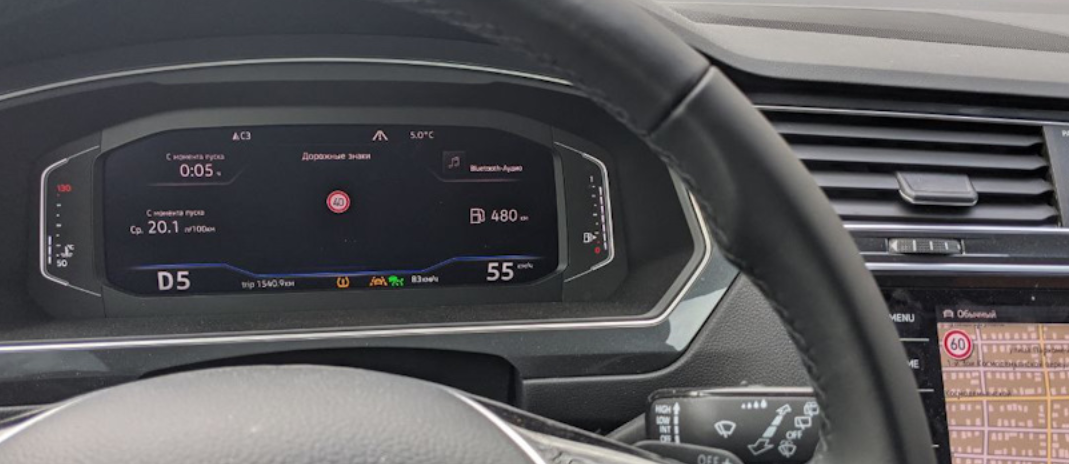
模块 5F(多媒体)→ 匹配:
Car_Function_List_BAP_Gen2:
- traffic_sign_recognition_0x21: 关闭
→ 应用
Car_Function_Adaptations_Gen2:
- menu_display_road_sign_identification: 关闭
- menu_display_road_sign_identification_over_threshold_high: 关闭
→ 应用
模块 5F(多媒体)→ 编码:
byte_24_vza: 激活
接近路口时的路口照明
顶配 MID LED 大灯能够点亮路口的侧向照明,并且在接近转弯处时依据导航数据自行转动灯光。
模块 4B → 编码:
psd_data: 激活
Crossing_light_with_route_data: 激活 — 接近路口时开启侧向照明
Predictive_afs: 激活 — 依据导航地图控制转弯时的灯光
此后必须进行大灯基础设置!